Auto-detect bills
Securely link your bank through Plaid to find recurring charges, credit card due dates, and loan payments.
Private bill tracking for iPhone
See every bill, due date, and payment in one private place. Add bills yourself or connect your bank read-only when you want help finding recurring charges.
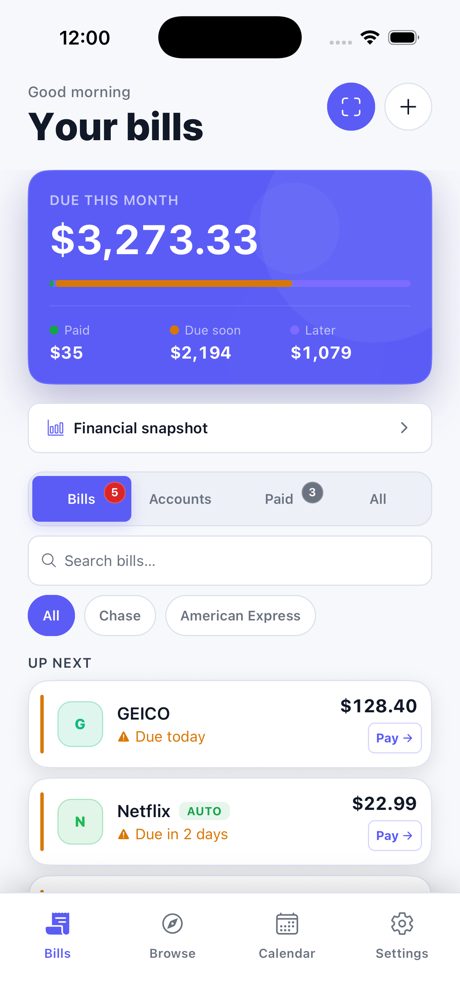
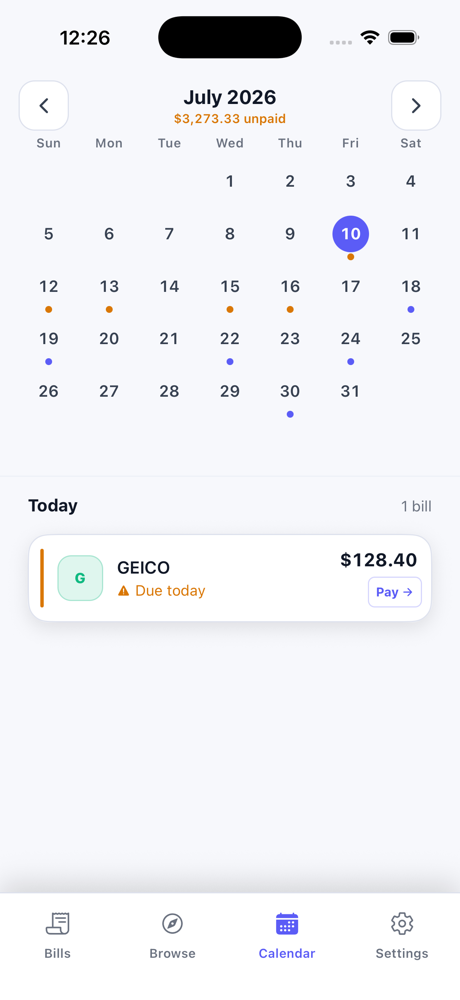
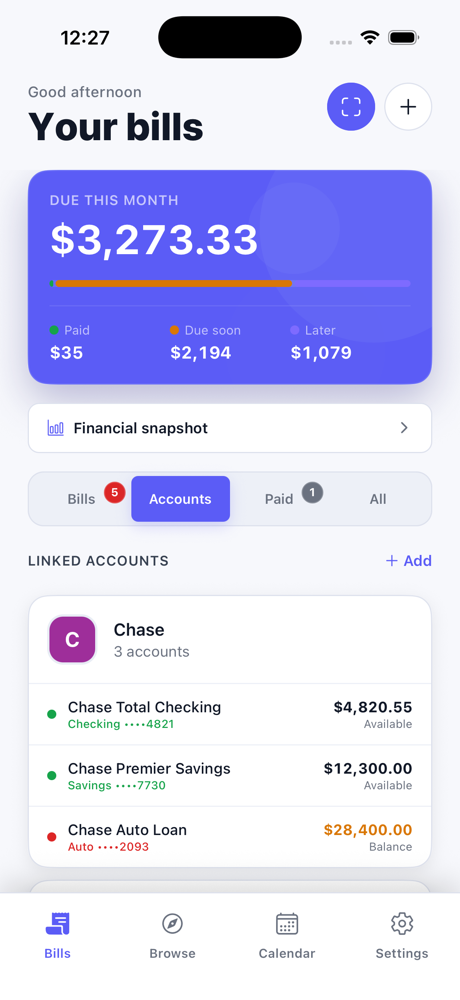
A focused bill tracker with the details that matter, without ads, noisy dashboards, or another financial account to manage.
Securely link your bank through Plaid to find recurring charges, credit card due dates, and loan payments.
Your bills and connected-bank transaction history are encrypted and stored locally. There is no advertising profile or analytics trail.
Get due-date reminders plus an optional digest of potential recurring bills to review before adding.
See minimum payments and statement balances side by side, with a clear picture of what is still outstanding.
Share your bill list across devices with end-to-end encryption. Your bill data remains unreadable to us.
Jump directly to your bank or biller's payment page when it is time to pay, without hunting for the right URL.
Paidly gives you a simple picture of what is paid, what is coming up, and the accounts behind it.
Start with the bills you already know, then add bank connections when you want help finding recurring charges.
Choose from the built-in biller library, add bills manually, or connect a bank to find recurring charges.
Paidly groups what is overdue, due soon, upcoming, and paid, with amounts and progress at a glance.
Get reminded before the due date, then open the right payment page directly from your bill.
Every plan keeps your bill list private. Upgrade only when bank connections or encrypted sync are useful to you.
$0forever
A private home for every bill you track yourself.
7 days free for eligible new subscribers
$5.99per month
Two read-only bank connections and encrypted sync for your bill list.
$9.99per month
For households and finances that span more accounts.
Clear answers about how Paidly handles your bills, payments, and optional bank connections.
Paidly.To is an iPhone bill tracker that puts bills, payment due dates, reminders, and recurring charges in one private place.
No. Paidly.To does not move money or initiate payments. It helps you track bills and can open the right biller or bank payment page when it is time to pay.
Yes. You can add and track bills manually without creating an account or connecting a bank. Bank connections are optional and help find recurring charges.
Paidly.To is currently available for iPhone through the App Store.
Privacy is part of Paidly's architecture, not a setting hidden behind an upgrade.
Stored on your device. Bill data is encrypted locally using SQLCipher.
No account required. No email, password, or personal profile to breach.
Read-only bank access. Paidly cannot initiate transfers or move your money.
Zero data sales. Your information is never sold or shared with advertisers.
Delete whenever you choose. Remove your bank connection and local data from the app.
Biometric protection. Optionally require Face ID or Touch ID whenever Paidly opens.
Paidly.To is built by LJ Brylewski for people who want a clear view of every due date. Bank connections are optional and read-only—Paidly.To can never move your money.
Questions about privacy or the app? Email LJ.
Keep bills, due dates, and payments in one private place on your iPhone.